WP Cerberのセキュリティ機能
最先端のセキュリティアルゴリズムを搭載したCerber Securityは、WordPressをハッカー攻撃やあらゆる種類のスパムから効果的に保護します。
English version: WP Cerber Security Features
- IPアドレスまたはサブネットによるログイン時のログイン試行回数を制限する(クラスC)
- ログインフォーム、XML-RPC、REST APIリクエスト、または認証クッキーによるログインを監視します。
- 豊富な地域別国別ルールでアクセスを制限
- ホワイトIPアクセスリストとブラックIPアクセスリストを使用して、IPアドレス、IP範囲、またはサブネットに基づいてアクセスを制限します。
- 一連のトラップとハニーポットを使用して、ボットやハッカーの活動を検出します。
- マルウェアスキャナー&WordPress整合性チェッカー
- マルウェアと疑わしいファイルの自動クリーンアップ
- 1つのダッシュボードから複数のWP Cerberインスタンスを管理できます。
- Traffic Inspectorは、疑わしいリクエストをすべてスクリーニングし、ウェブサイトに損害を与える可能性がある場合はブロックします。
- ログインおよびログアウトプロセスに関連するすべてのアクティビティをログに記録します。
- WordPressアカウントを二段階認証(2FA)で保護します
- 同時ユーザーセッション数を制限する
- スパム対策: WordPressおよびWooCommerceフォーム用のreCAPTCHA
- wp-login.php を攻撃から保護し、404 HTTP エラーを返す
- ユーザーがログインしていない場合は、 wp-admin(ダッシュボード)を非表示にして、HTTPエラー404を返す
- ログイン用のカスタムログインURLを作成する( wp-login.phpの名前を変更する)
- 1つのIPアドレスからの登録数を制限します
- WordPressアプリケーションのパスワード管理を正しく行う方法
- WordPressユーザーアカウントをブロックする
- 禁止ユーザー名のセットを使用するか、正規表現によるユーザー名パターンを指定することで、ユーザー登録をブロックします。
- WordPress REST API のロールベースアクセス制御
- reCAPTCHAとCerberアンチスパム・ボット検出エンジンで登録フォームを保護します。
- 存在しないユーザー名でログインしようとした場合は、IPアドレスまたはサブネットを即座にブロックします。
- ログインページへの自動リダイレクトを無効にする
- WordPress REST APIを無効にする
- XML-RPCを無効にする:PingbacksやTrackbacksを含むXML-RPCサーバーへのアクセスをブロックします。
- フィードを無効にする(RSS、Atom、RDFフィードへのアクセスをブロックする)
- IPアドレス、IP範囲、またはサブネットによるホワイトアクセスリストを使用して、XML-RPC、REST APIフィードへのアクセスを制限します。
- 著者ページを介したユーザー列挙を停止する
- REST API を介したユーザー列挙を停止します
- DoS攻撃( CVE-2018-6389 )に対する保護
- 疑わしいIPアドレスに対してIPサブネットクラスCを事前にブロックする
- 圧倒的な力による攻撃のためのシタデルモード
- fail2banとうまく連携する:失敗した試行をsyslogまたはカスタムログファイルに書き込む
- Cloudflareの特別なアドオンにより、追加のセキュリティレイヤーを提供します。
- IPアドレス、ユーザー名、または特定のイベントでアクティビティリストを表示およびフィルタリングします。
- IPアドレスに関する追加のWHOIS情報:国、不正利用に関する連絡先、ネットワーク所有者など
- リバースプロキシの背後にあるサイト/サーバーを処理します
- レート制限付きのメール通知設定が可能
スクリーンショット
-
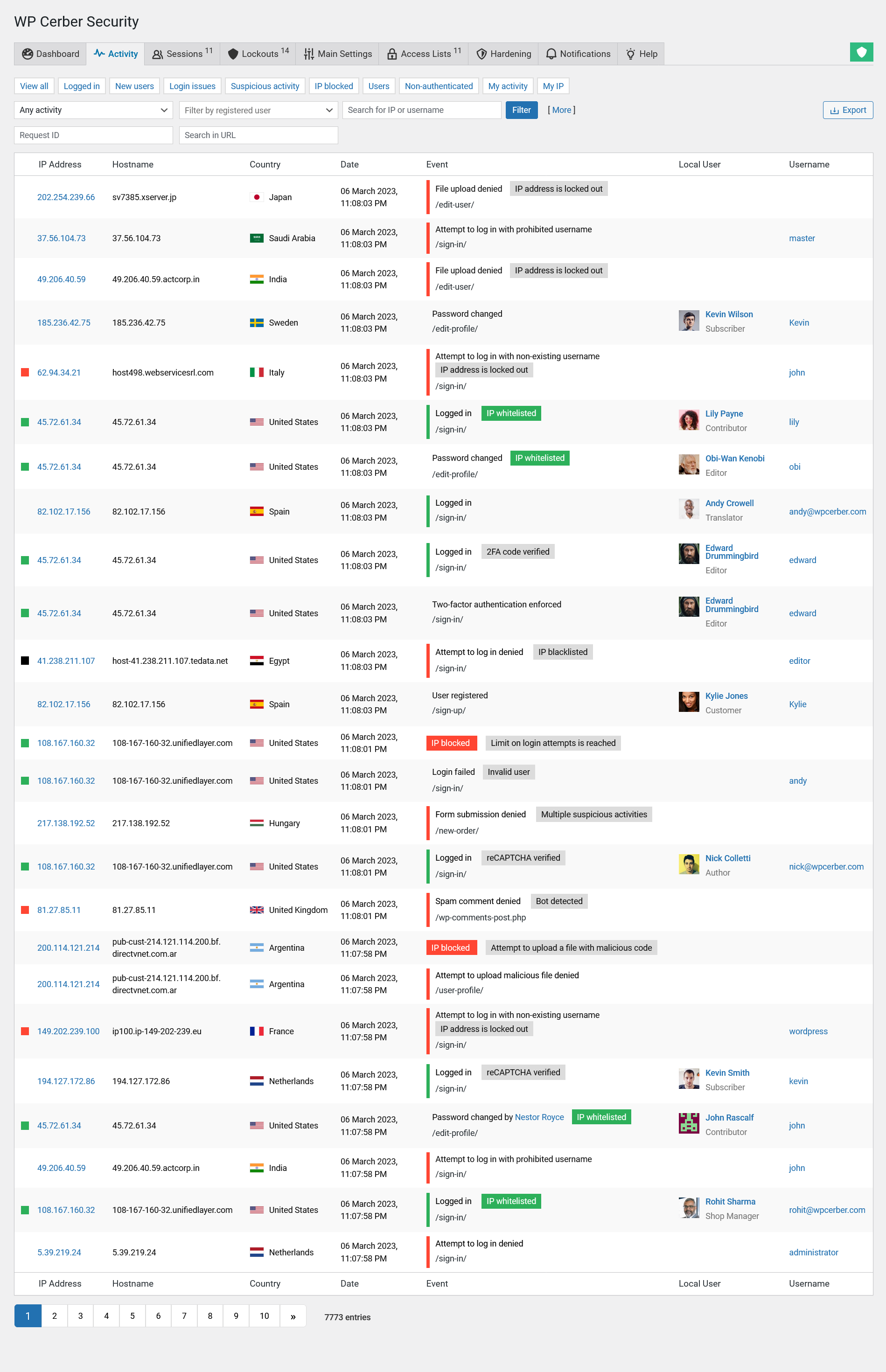
- The activity log in WP Cerber helps website owners and WordPress administrators monitor user activity, identify potential security threats, and troubleshoot issues that may arise on the website. The log search feature enables administrators to quickly find specific events in the activity log that they are looking for, such as failed login attempts or malicious IP addresses.
-
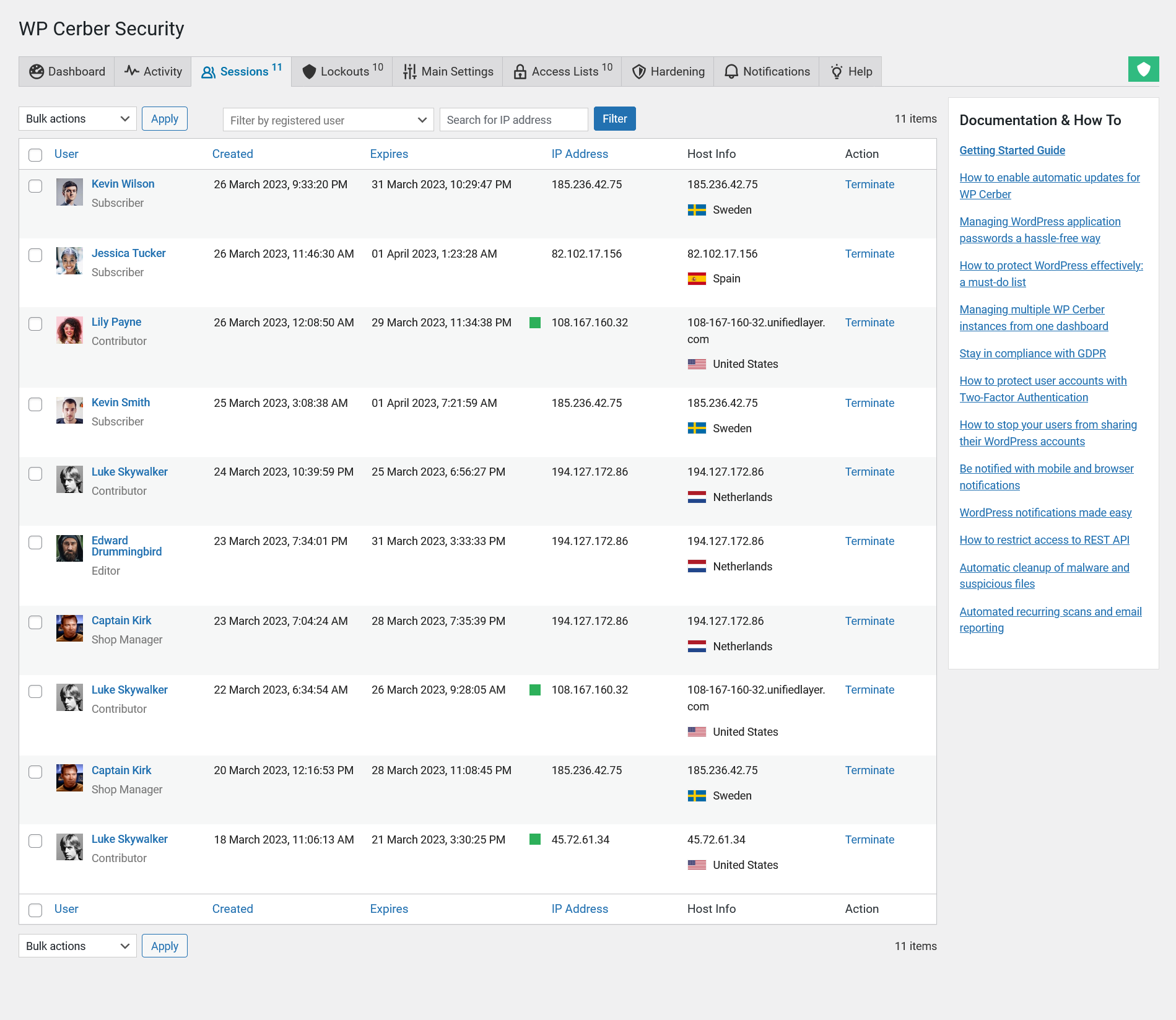
- A user session management console is a tool that enables WordPress administrators to manage user sessions on their websites from a central location. It allows administrators to search for, monitor, and manage active user sessions, including the ability to view user activity and terminate user sessions.
-
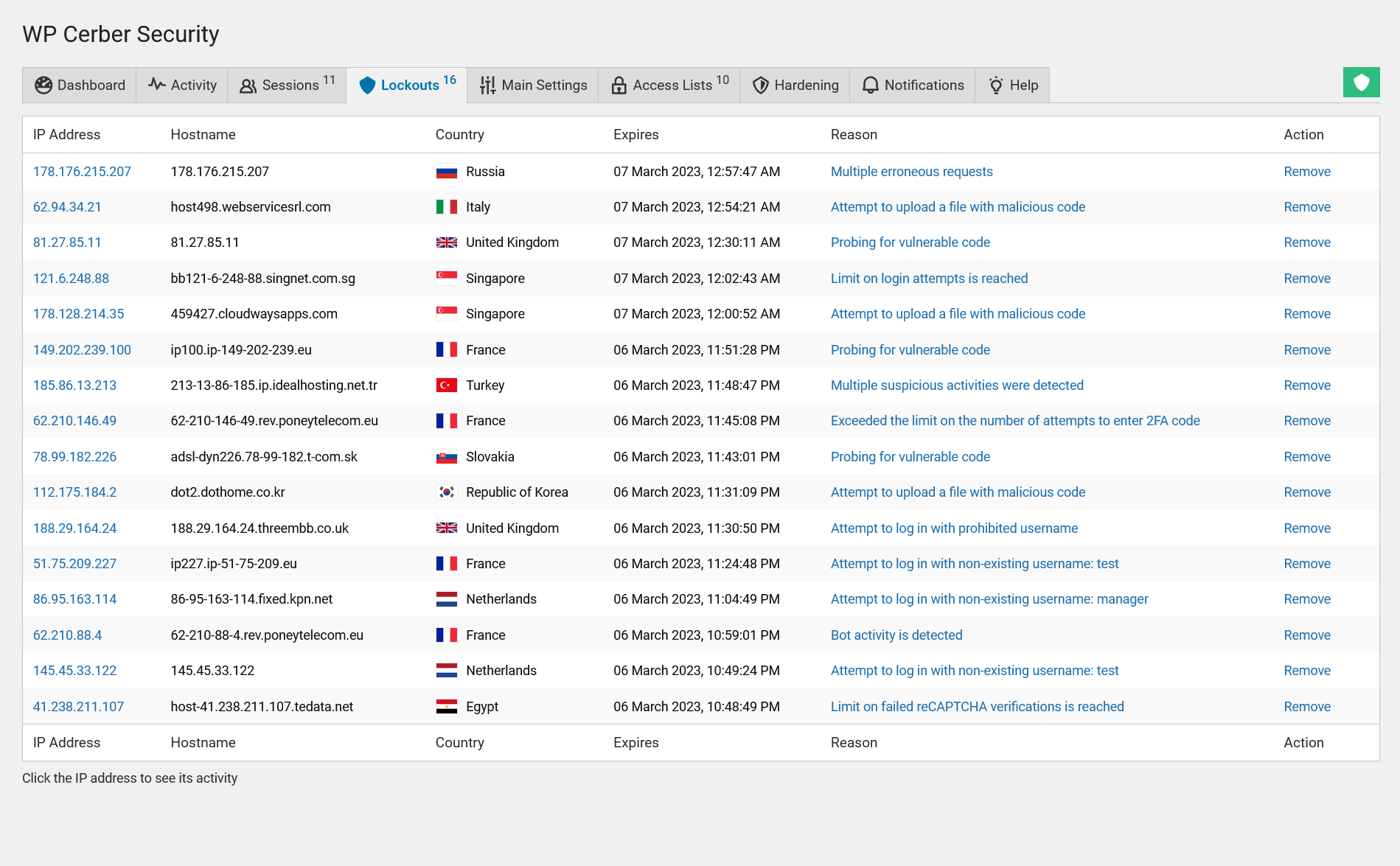
- A list of blocked malicious IP addresses is another tool for WordPress administrators. It provides a detailed overview of all IP addresses that have been blocked by WP Cerber, including host names, countries of origin, reasons for being blocked, and the ability to unlock an IP address if necessary. The blocked IP addresses are not allowed to log in, submit forms, or interact with the website in other ways. By clicking on a link in the Reason column, you will be directed to the activity log, which displays the malicious requests originating from the blocked IP address.
-
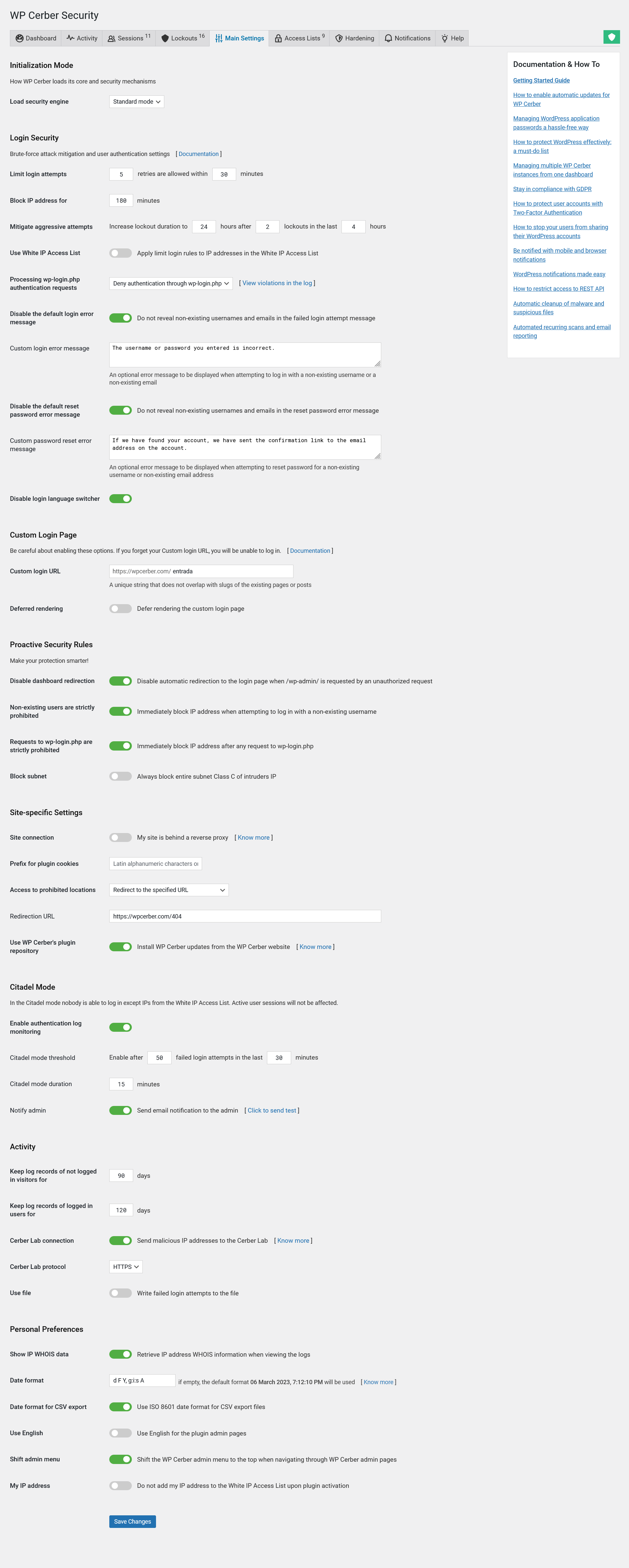
- The Main Settings tab enables you to configure login security features, brute-force protection parameters, custom WordPress login page and other important plugin settings. Here WordPress administrators can configure the protection for the default login page, parameters of advanced and proactive security policies.
-
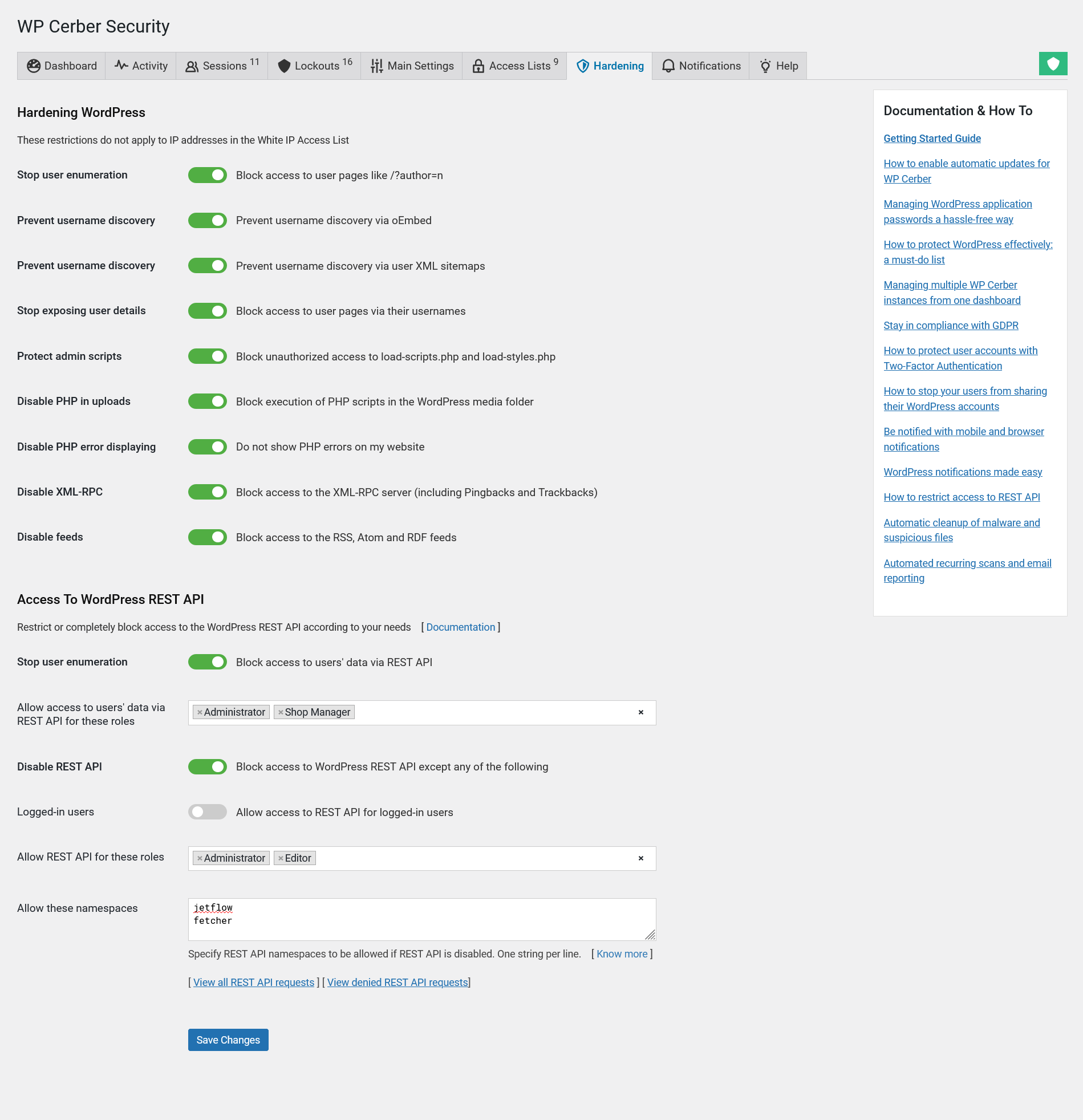
- On the Hardening tab you can manage multiple access control features that block access to sensitive website data, prevent user enumeration, disable user detail exposure, restrict access to WordPress REST API, and other WordPress data interfaces that are vulnerable to bad actors and data scraping bots. To monitor the usage of REST API, use the links at the bottom of the page.
-
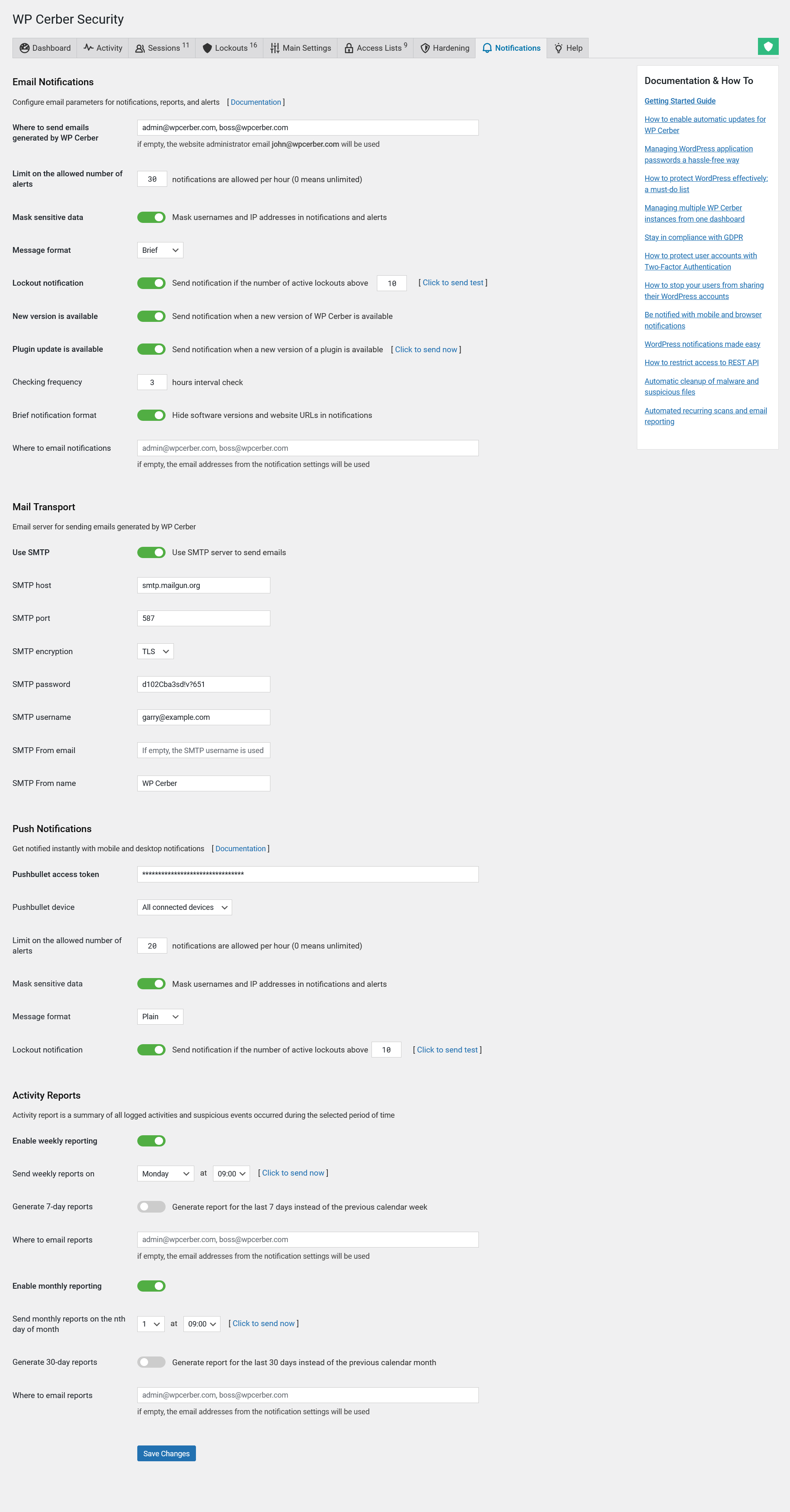
- On the Notification tab administrators configure email parameters for notifications, alerts, and reports. WP Cerber provides mobile alerts and email notifications to WordPress administrators to keep them informed about security-related events on their websites. Weekly and monthly security reports provide a comprehensive summary of security-related activity on the website and enables administrators to take proactive measures to prevent potential security breaches. To keep your WordPress plugins up to date, enable notifications when a new version of a plugin is available.

I'm a team lead in Cerber Tech. I'm a software & database architect, WordPress - PHP - SQL - JavaScript developer. I started coding in 1993 on IBM System/370 (yeah, that was amazing days) and today software engineering at Cerber Tech is how I make my living. I've taught to have high standards for myself as well as using them in developing software solutions.