
How to install WP Cerber Security
WP Cerber Security is an open-source WordPress security plugin and available for download from our website for free.
The plugin works out of the box and starts protecting your WordPress immediately after the activation. To install or update the plugin manually, follow the steps below and refer to the screenshot.
If you’re upgrading from an older version of WP Cerber, all your settings will be carried over automatically.
- Download the latest version of WP Cerber from our website to your computer using this link: https://downloads.wpcerber.com/plugin/wp-cerber.zip
- Click Plugins in your WordPress admin menu
- Click the Add New button located near the title of the page
- Click the Upload Plugin button located near the title of the page
- Select the downloaded wp-cerber.zip file from your computer
- Click the Install Now button
- Click the Activate Plugin button
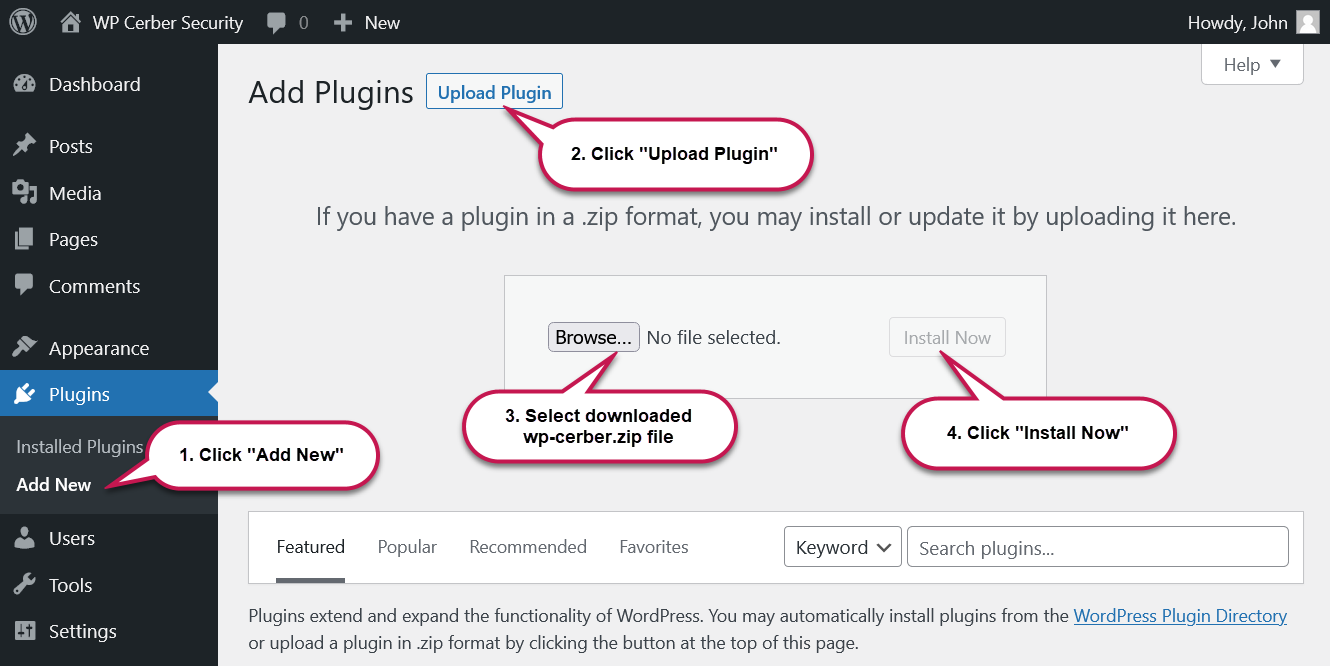
How to install WP Cerber plugin on WordPress
Still have questions after following these steps? Get help from the WP Cerber community on our forum.
The current supported version of WP Cerber is 9.10
Running the latest release is essential to maintain site security and ensure full compatibility with modern WordPress environments. Version 9.10 is the only actively maintained build; earlier releases are no longer supported.
We strongly advise administrators running legacy versions to upgrade to 9.10, which includes critical engine improvements, improved PHP compatibility, and the latest security algorithms.
Download link: https://downloads.wpcerber.com/plugin/wp-cerber.zip
Security Warning: Always obtain WP Cerber installation archives directly from our official website wpcerber.com or wordpress.org. Third-party downloads and unofficial mirrors are not verified, unsupported, and pose significant security risks to your WordPress installation.
Keep Your Website Secure




I'm a software engineer and team lead at Cerber Tech. I started coding in 1993 on IBM System/370 and today software engineering at Cerber Tech is how I make my living.