
Under the Hood of WP Cerber 9.9
English version: Under the Hood of WP Cerber 9.9
Deze release draait voornamelijk om de onderdelen van WP Cerber die je pas opmerkt als er iets misgaat. We hebben de manier waarop instellingen worden opgeslagen en hersteld, hoe de Traffic Inspector versleutelde JavaScript leest en hoe de plugin zich gedraagt op oudere hostingomgevingen, verbeterd. We hebben ook een langlopende migratie van de WordPress Settings API afgerond. Hieronder lees je wat er onder de motorkap is veranderd en wat dit betekent voor de websites die je beheert.
Instellingen die behouden blijven na een beschadigde database
WP Cerber bewaart zijn configuratie in één enkele opgeslagen optie, CERBER_CONFIG . Tot nu toe, als die waarde beschadigd raakte en niet meer kon worden gedeserialiseerd, gaf de plugin het beschadigde resultaat rechtstreeks door aan array_merge() . Op PHP 8 veroorzaakte dat een fatale TypeError tijdens het laden van de plugin. Omdat de fout optrad tijdens het laden, legde de hele website plat, niet alleen de beheerschermen van de plugin.
crb_get_settings() valideert nu wat crb_unserialize() retourneert voordat de waarde wordt gebruikt. Wanneer de opgeslagen gegevens niet in een array kunnen worden geparseerd, valt de plugin terug op de standaardinstellingen in plaats van te crashen. De fout wordt geregistreerd als een persistent kritiek probleem via CRB_Issues::add() onder de code corrupted_settings . Dit probleem wordt automatisch opgelost de volgende keer dat u de instellingen opslaat, wat wordt uitgevoerd in cerber_settings_update() .
We hebben zorgvuldig onderscheid gemaakt tussen twee gevallen die op elkaar lijken, maar dat niet zijn. Een lege of anderszins onjuiste opgeslagen waarde betekent simpelweg dat de instellingen nog niet bestaan. Die waarde wordt nooit gedeserialiseerd en de plugin valt stilzwijgend terug op de standaardinstellingen zonder een foutmelding te geven. Het melden ervan zou een vals alarm zijn. Het probleem corrupted_settings treedt nu alleen op wanneer een niet-lege opgeslagen waarde niet kan worden gedeserialiseerd naar een array, wat precies de oorzaak was van de oorspronkelijke crash in de productieomgeving.
Twee nabijgelegen branches binnen dezelfde functie hebben dezelfde discipline gekregen. De samenvoeging van Cloudflare-add-oncompatibiliteit vereist nu een array voordat deze kan worden samengevoegd. De CERBER_WP_OPTIONS branch retourneert altijd een array wanneer er geen specifieke instelling wordt aangevraagd.
Een zelfherstellende back-up bovenop de beveiliging
Terugvallen op de standaardinstellingen zorgt ervoor dat een site blijft draaien, maar negeert tegelijkertijd de configuratie van de beheerder. Daarom hebben we een herstellaag bovenop deze beveiliging toegevoegd. Een nieuwe klasse, CRB_Settings_Backup , bewaart een laatst bekende geldige kopie van CERBER_CONFIG in de eigen sleutel-waardeopslag van de plugin.
De back-up wordt opgeslagen als onbewerkte JSON, samen met de ID van de gebruiker die deze heeft gemaakt, een tijdstempel en de context waarin deze is gegenereerd. De back-up wordt vernieuwd na een succesvolle update van de instellingen, na een import van instellingen, na een plugin-upgrade en door de dagelijkse onderhoudstaak. Alleen een geldige configuratie en een bekende contextcode mogen een bestaande back-up vervangen.
Wanneer de corruptiedetector een onleesbaar CERBER_CONFIG vindt, wordt het herstelproces automatisch uitgevoerd. Bij een succesvol herstel registreert de plugin een waarschuwing die kan worden weggeklikt. Deze waarschuwing legt uit wat er is gebeurd en vraagt u uw instellingen te controleren en op te slaan. De melding verdwijnt zodra u dit doet. Als er geen bruikbare back-up bestaat of als de herstelde waarde niet kan worden weggeschreven, behoudt de plugin zijn bestaande noodprocedure en valt terug op de standaardinstellingen. In dat geval registreert de plugin een kritiek probleem in plaats van de waarschuwing.
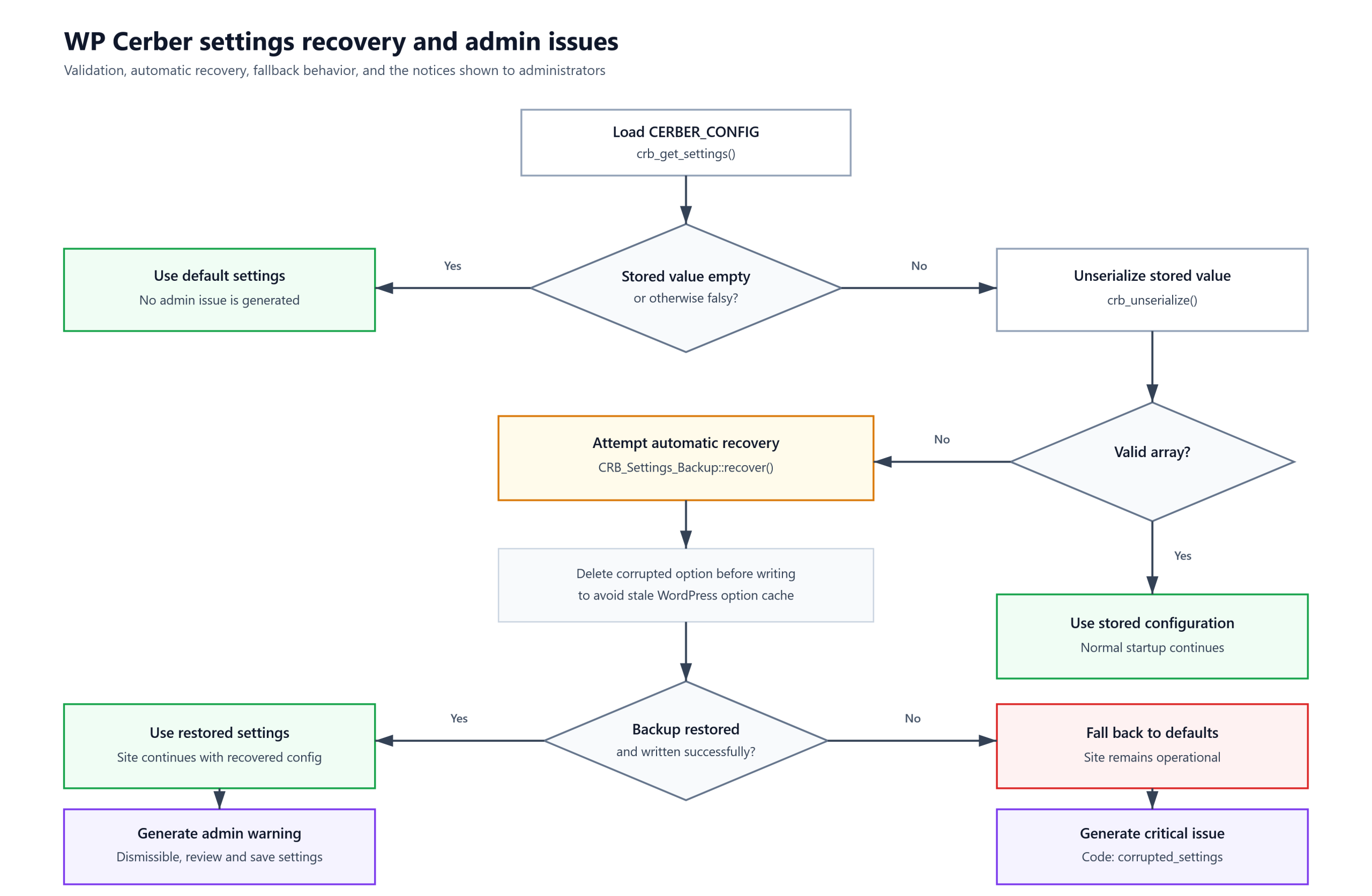
WP Cerber settings recovery flow. Missing settings quietly fall back to defaults, while corrupted settings trigger automatic recovery from the last-known-valid backup.
Om het herstelproces goed te laten verlopen, was het belangrijk om rekening te houden met de WordPress-cache. recover() `-functie verwijdert de beschadigde CERBER_CONFIG -optie voordat de herstelde waarde wordt weggeschreven. Zonder deze stap zou een verouderde optiecache ervoor kunnen zorgen dat update_site_option() ` de waarde als ongewijzigd beschouwt en de databaseschrijfbewerking overslaat. De back-up zelf wordt gelezen en geschreven zonder de objectcache te gebruiken, waardoor alleen het duurzame cerber_sets -record wordt vertrouwd. De set met geaccepteerde contextcodes is gesloten. De `writer`, sync() , en de payloadvalidator accepteren beide alleen de vier gedeclareerde codes, zodat elke opgeslagen payload dezelfde validatie kan doorstaan die het herstelproces later uitvoert.
Geen fatale fouten meer op hosts zonder mysqlnd
WP Cerber leest gegevens uit de database via mysqli. Eén ophaalpad, CRB_Database::fetch_result_set() , gebruikt mysqli_result::fetch_all() om een volledige resultatenset in één keer op te halen. Deze methode bestaat alleen wanneer de mysqli-extensie van PHP is gebouwd met de mysqlnd-driver. Op hosts waar mysqli is gecompileerd met de oudere libmysqlclient-bibliotheek, ontbreekt de methode en leidt het aanroepen ervan tot een fatale fout.
De oplossing volgt een patroon dat al elders in cerber-common.php is gebruikt. Voordat de snelle methode wordt toegepast, controleert de code nu of de function_exists('mysqli_fetch_all') . Als deze functie niet beschikbaar is, leest de code de resultaatset rij voor rij met mysqli_result::fetch_array() , zowel voor de MYSQLI_ASSOC als de MYSQLI_NUM vorm. De volgorde van de rijen, de resultaatstructuur, de opschoning en het bestaande Revalt retourcontract blijven behouden. De fallback retourneert dezelfde gegevens als de snelle methode.
We hebben beheerders ook een manier gegeven om te zien wanneer ze de fallback-modus gebruiken. Een nieuwe detector in CRB_Issue_Monitor geeft een waarschuwing, db_driver_no_mysqlnd , wanneer de mysqli-extensie is geladen maar mysqli_fetch_all() ontbreekt. De melding verschijnt in de widget 'Systeemgereedheid'. Het is een informatieve melding. Het bevestigt dat de plug-in blijft werken via de fallback-modus en adviseert om mysqlnd in te schakelen voor betere compatibiliteit en prestaties.
Betere detectie van versleutelde JavaScript
CRB_JS_Detector inspecteert aanvraagvelden als onderdeel van de Traffic Inspector, die standaard is ingeschakeld. Het zoekt naar JavaScript dat is geobfusceerd om primitieven zoals eval , script en XMLHttpRequest te verbergen. Het doel van het ontwerp is een zeer betrouwbare detectie met een laag percentage valse positieven. De detector decodeert alleen invoer die ondubbelzinnig een gecodeerde tekenreeks is en laat al het andere ongemoeid. Verschillende wijzigingen in deze release hebben zowel een daadwerkelijke omzeiling verholpen als het toepassingsgebied van de detector uitgebreid.
Een regressie waardoor volledig hex-escaped strings werden doorgelaten.
De release begon met een bugfix. De hex-escape-heuristiek normaliseerde elke overeenkomende tekenreeks met trim( $m, "\\'\"" ) . PHP's trim() behandelt het tweede argument als een reeks tekens die moeten worden verwijderd, niet als een letterlijk voorvoegsel. De backslash in die reeks verwijderde de voorloopbackslash van de eerste \xNN -escape samen met het openingscitaat. Wat overbleef had een oneven lengte van 2N + 1 Een controle op oneven lengtes besloot vervolgens dat de tekenreeks niet correct hex-gecodeerd was en sloeg de decodering volledig over. Het praktische gevolg was dat een tekenreeks die uitsluitend uit \xNN escapes bestond, de inspectie omzeilde, en dat hex-geëscapte primitieven zoals eval , script en XMLHttpRequest onopgemerkt bleven op het standaard request-field-pad. De fix herstelt de correcte decodering van volledig hex-geëscapte tekenreeksen.
Bredere dekking van escape- en tekencodes
Vervolgens hebben we het begrip van de detector uitgebreid. De ontsnappingsheuristiek herkende voorheen alleen \xNN . Nu kan deze ook \uNNNN en \u{...} ontsnappingen verwerken, inclusief strings die deze formaten combineren, terwijl de regel behouden blijft dat alleen volledig ontsnapte strings worden gecontroleerd. Het decoderen is verplaatst naar een speciale helperfunctie, cerber_decode_js_escapes() , die ASCII-codepunten decodeert en al het andere behoudt. Als er een interne PCRE-fout optreedt, retourneert deze helperfunctie de oorspronkelijke invoer in plaats van een lege string, zodat een decoderingsfout de gecontroleerde waarde niet kan wissen.
De heuristiek voor tekencodering is ook gewijzigd. Voorheen onderzocht deze alleen gedecodeerde uitvoer op externe URL's en IP-adressen. Nu zoekt deze ook naar uitvoerings- en DOM-primitieven. Getallen worden alleen gedecodeerd vanuit een expliciete fromCharCode(...) constructie, en niet vanuit een willekeurige numerieke array die wordt aangetroffen. Beide heuristieken delen nu één tokenbewust primitief patroon met identificatiegrenzen. Deze wijziging zorgt ervoor dat gewone woorden zoals description en evaluation niet meer overeenkomen met de subtekenreeksen eval of script erin.
Ingepakte integer-literalen
fromCharCode is gedefinieerd om ToUint16 toe te passen op elk argument. Dit betekent dat een ASCII-code plus een veelvoud van 65536 hetzelfde teken oplevert. Een eerdere versie van de heuristiek accepteerde alleen letterlijke waarden tot zes cijfers, waardoor een zevencijferige waarde met omwikkelde regels erdoorheen glipte. Bijvoorbeeld, 1048677 wordt gedecodeerd naar code-eenheid 101, de letter e . De detector accepteert nu niet-ondertekende decimale en hexadecimale letterlijke waarden tot Number.MAX_SAFE_INTEGER en reduceert elk ervan naar de ToUint16-code-eenheid, onafhankelijk van de integergrootte van PHP. Het verwerpt decimale getallen met voorloopnullen, omdat deze ambigu zijn met het oude octale stelsel. Het beperkt de hoeveelheid werk per cijfer, zodat een zeer lange letterlijke waarde in een openbaar verzoek geen onbeperkte berekening kan veroorzaken.
Een vervolgactie dichtte een gerelateerde lacune. Door een lege tekenreeks terug te geven bij het eerste niet-ondersteunde argument werd de hele gedecodeerde aanroep geblokkeerd. Een aanvaller kon een enkel token buiten het bereik toevoegen aan een verder detecteerbare payload en zo de detectie onderdrukken. Een voorbeeld van zo'n token is 9007199254741024 , dat JavaScript via ToUint16 naar een spatie vertaalt. Nu wordt een structureel geldig, maar niet-ondersteund token vervangen door een underscore als sentinelteken, terwijl de rest van de aanroep nog steeds wordt gedecodeerd. De underscore is een woordteken, waardoor het ook voorkomt dat er een gefabriceerde identificatiegrens naast een trefwoord wordt gevormd.
Argumenten gescheiden door commentaar
De laatste methode om de detectie te omzeilen maakte gebruik van JavaScript-commentaren. De heuristiek comprimeerde de invoer door witruimte te verwijderen, waardoor commentaren behouden bleven. Een commentaar tussen numerieke argumenten verbrak de overeenkomst met de numerieke lijst, waardoor een aanroep zoals String.fromCharCode(101,/*x*/118,97,108,40,49,41,59) niet werd gedetecteerd. De detector verwijdert nu blok- en regelcommentaren uit de argumentenlijst fromCharCode voordat deze wordt gevalideerd en gedecodeerd, terwijl de inhoud van geciteerde strings behouden blijft. De capture werkt ook in dotall-modus, waardoor een argumentenlijst die meerdere regels beslaat als één enkele aanroep wordt gelezen.
De WordPress-instellingen-API wordt uitgefaseerd.
De instellingenpagina's van WP Cerber waren gebouwd op de WordPress Settings API. Formulieren werden verzonden naar /wp-admin/options.php , en de plugin maakte gebruik van register_setting() , add_settings_section() , add_settings_field() , settings_fields() en do_settings_sections() om ze te registreren en weer te geven. Dat werkte, maar het verbond de admin-interface van de plugin aan een procedureel WordPress-subsysteem en de bijbehorende conventies. Deze release voltooit de overstap naar een eigen formulierengine voor de plugin, en we hebben dit gefaseerd gedaan in plaats van in één keer.
Eerst hebben we een grens getrokken. Alle directe aanroepen naar de Settings API zijn verplaatst naar één statische klasse, CRB_Legacy_Settings_Manager . Een analyse van de codebase wees uit dat slechts vijf van de tien Settings API-functies werden gebruikt, verdeeld over zes aanroeplocaties in twee bestanden. De andere vijf werden nooit aangeroepen, dus de afgebakende klasse heeft bewust geen methoden voor deze functies. Deze stap zorgde ervoor dat het gedrag exact behouden bleef. Optienamen, optiegroepen, sectie- en veld-ID's, callbacks, timing van hooks en uitvoer bleven allemaal ongewijzigd.
Vervolgens hebben we de vervanging gebouwd. Een nieuwe klasse, CRB_Settings_Renderer , rendert secties en veldrijen rechtstreeks vanuit de declaratieve configuratie die wordt geretourneerd door cerber_settings_config() . Instellingenformulieren sturen nu een POST-verzoek terug naar de eigen beheerderspagina van de plugin in plaats van naar options.php . Inzendingen worden verwerkt door de bestaande pipeline in admin_init en vervolgens gevolgd door een POST-redirect-GET-verzoek terug naar de instellingenpagina. De gerenderde markup is byte-identiek aan wat do_settings_sections() voorheen produceerde, tot aan de koppen, sectieblokken en formulier-tabelrijen.
De nonce-verificatie is hiermee veranderd. In plaats van check_admin_referer() te gebruiken tegen een optiegroep in de Settings API, verifieert de plugin nu zijn eigen cerber_nonce veld. Dit veld was al aanwezig in elk instellingenformulier, inclusief formulieren die door oudere versies werden weergegeven. Een ongeldige of verlopen nonce stopt het verzoek niet langer met wp_die() . Er wordt een beheerdersmelding in de wachtrij geplaatst en je wordt teruggestuurd naar het formulier.
Door options.php te verplaatsen is ook een stukje verouderde functionaliteit verdwenen. Het oude pad schreef een onbewerkte kopie van elke formuliergroep naar een optie per groep met de naam cerber-{group} . Deze kopieën werden alleen gelezen tijdens de migratie van vóór versie 9.3.4 en bij het opruimen na een deïnstallatie, nooit tijdens de uitvoering. Ze worden nu niet meer geschreven.
Cerber.Hub en beheerde sites
Twee contexten behielden het oude pad nog even, omdat beide afhankelijk waren van het API-draadformaat voor instellingen. De ene was Cerber.Hub remote rendering, waarbij het protocol tussen een hoofdsite en de beheerde sites de velden option_page en _wpnonce verstuurde. De andere was het bewerkingsscherm van de beheerde site, dat opsloeg via een pre_update_option filter dat werd geactiveerd door options.php . We hebben ze één voor één gemigreerd.
Het bewerkingsformulier voor beheerde sites wordt nu weergegeven via CRB_Settings_Renderer en opgeslagen via een nieuwe functie, nexus_save_client_data_form() . Deze functie reproduceert exact de gegevensverwerking van de oude callback, inclusief de groepsresolutie, de strip_tags -sanering van eigenaarsgegevens en het opruimen van ongebruikte groepen. De beveiligingsgrens blijft hetzelfde met een expliciete nexus_is_main() en is_super_admin() guard. De Cerber.Hub-client heeft vervolgens ook de emulatie van de Settings API laten vallen. Daarna werden CRB_Legacy_Settings_Manager en verschillende inmiddels niet meer gebruikte helpers verwijderd.
Formulieren voor externe instellingen verzenden niet langer de verborgen velden van de Settings API, zoals option_page , action=update , _wpnonce of _wp_http_referer . Ze bevatten nu dezelfde interne velden als lokale formulieren, plus het Nexus-zegel in de externe context. De authenticatie van Nexus Transport blijft ongewijzigd en vormt nog steeds de buitenste grens voor verzoeken aan beheerde sites. nexus_is_valid_request() , nexus_is_granted() en de cerber_nexus_seal round trip werken allemaal zoals voorheen. Een doorgestuurde inzending controleert nog steeds de nonce van de plugin voordat de instellingen worden verwerkt. We hebben ook een controle op het toegangspunt toegevoegd. Een ingediend instellingenscherm dat niet naar een bekend scherm verwijst, wordt nu afgesloten met een WP_Error voordat de verwerking begint, en het foutbericht bevat de ingediende waarde voor diagnostische doeleinden.
Een abrupte overgang, en iets om te weten na de upgrade.
Dit was een bewuste, abrupte overgang. We hebben geen overgangspad met twee formaten behouden en er is geen verwerking meer options.php . Deze beslissing brengt één uitzondering met zich mee, die het waard is om duidelijk te vermelden. Als een instellingenformulier werd weergegeven door de vorige versie van WP Cerber en u dit na de upgrade indient, kan het eenmalig mislukken. In dat geval kunt u de instellingenpagina opnieuw openen en het formulier opnieuw indienen. Het nieuw weergegeven formulier bevat het nieuwe interne contract en wordt normaal opgeslagen. Hetzelfde geldt voor externe instellingenformulieren op beheerde sites.
De migratie ging gepaard met een opschoning van de naamgeving. De overbelaste term ' group werd overal waar deze een instellingenscherm identificeerde, hernoemd naar settings_screen_id , inclusief de constante, de waarde van het verborgen formulierveld, de signaturen van de pipeline-functie en de configuratiesleutels. De foutcode op afstand werd hernoemd van unknown_settings_group naar unknown_settings_screen . Eén compatibiliteitsdetail is van belang voor add-on-ontwikkelaars. De payload update_settings gebeurtenis bevat nog steeds de oude group als alias van settings_screen_id , omdat cerber_add_handler() openbaar is en externe handlers deze kunnen lezen.
UI Factory basiswerkzaamheden
Onder de beheerschermen rendert WP Cerber HTML via een interne UI Factory in plaats van inline markup. Deze release voegde twee structurele bouwstenen toe. crb_ui_fragment() produceert een gemengde, geordende verzameling van kindelementen zonder omhullende tag. crb_ui_element_set() doet hetzelfde voor een homogene verzameling met een afgedwongen kindtype. We hebben de fluent CRB_UI_Fragment_Builder hernoemd naar CRB_UI_Content_Builder om verwarring met het nieuwe fragmentknooppunt te voorkomen, en we hebben een klasse-alias behouden zodat bestaande code blijft werken.
Een aantal aanroepsites is hierdoor vereenvoudigd. crb_ui_message_box() accepteert nu gewone tekenreeksen en getallen en plaatst deze in ontsnapte alinea-elementen, zodat bellers deze alinea's niet langer handmatig hoeven samen te stellen. De dubbele melding voor ophaalfouten op het dashboard en het verkeerslogboekscherm zijn samengevoegd tot één gedeelde helper. Het paneel voor omgevingsdiagnostiek is opnieuw opgebouwd op de nieuwe nodes. In elk geval is de gegenereerde HTML ongewijzigd gebleven. Dit vormt de basis voor een renderer-neutrale beheerdersinterface en is momenteel onzichtbaar op de pagina.
Na de upgrade
Een korte checklist voor beheerders:
- Als een instellingenformulier niet wordt opgeslagen bij de eerste indiening direct na de update, open dan de instellingenpagina opnieuw en sla de instellingen nogmaals op.
- Als WP Cerber terugvalt op de standaardinstellingen of deze herstelt vanuit een back-up, wordt u hiervan op de hoogte gesteld via een beheerdersmelding. Controleer uw instellingen en sla ze op om de melding te verwijderen.
- Als uw hostingprovider PHP zonder de mysqlnd-driver gebruikt, raadpleeg dan de melding in de widget 'Systeemgereedheid'. De plugin blijft gewoon werken en de melding legt de aanbevolen wijziging uit.
WP Cerber Security 8.6.3
Wat is RID en hoe gebruik je het?

I'm a team lead in Cerber Tech. I'm a software & database architect, WordPress - PHP - SQL - JavaScript developer. I started coding in 1993 on IBM System/370 (yeah, that was amazing days) and today software engineering at Cerber Tech is how I make my living. I've taught to have high standards for myself as well as using them in developing software solutions.