
WP Cerber Security 9.9.5
This release is about closing the distance between a security event and the setting that caused it. We rebuilt how WP Cerber links from the Activity log to the exact setting behind a decision, fixed two admin UI defects, and hardened the way the plugin escapes URLs in the admin area. Under the hood, we also started storing admin announcements as structured, validated data instead of rendered HTML.
Key Highlights
Links in Activity log explainers now take you to the right place. When WP Cerber’s decision was driven by a role policy, the link opens the correct role tab and highlights the exact field, instead of dropping you on a settings page to hunt for it yourself.
Following such a link now centers the target setting in the viewport, so the WordPress admin bar no longer covers it and you can see the neighboring settings for context.
The Mail Transport section no longer shows raw HTML where a link belongs.
Admin Experience
Role policy settings are now addressable. A link built for a setting used to carry a single value in the URL fragment with two conflicting meanings: the field to highlight, or the tab to open. A role policy setting could never be highlighted, because the slot its field needed was already taken by the tab pointer. The fragment now carries two independent declarations, each naming one thing and usable without the other. Practically, an explainer link [Manage] such as shown below becomes a one-click jump into the exact role tab with the responsible field flashing.
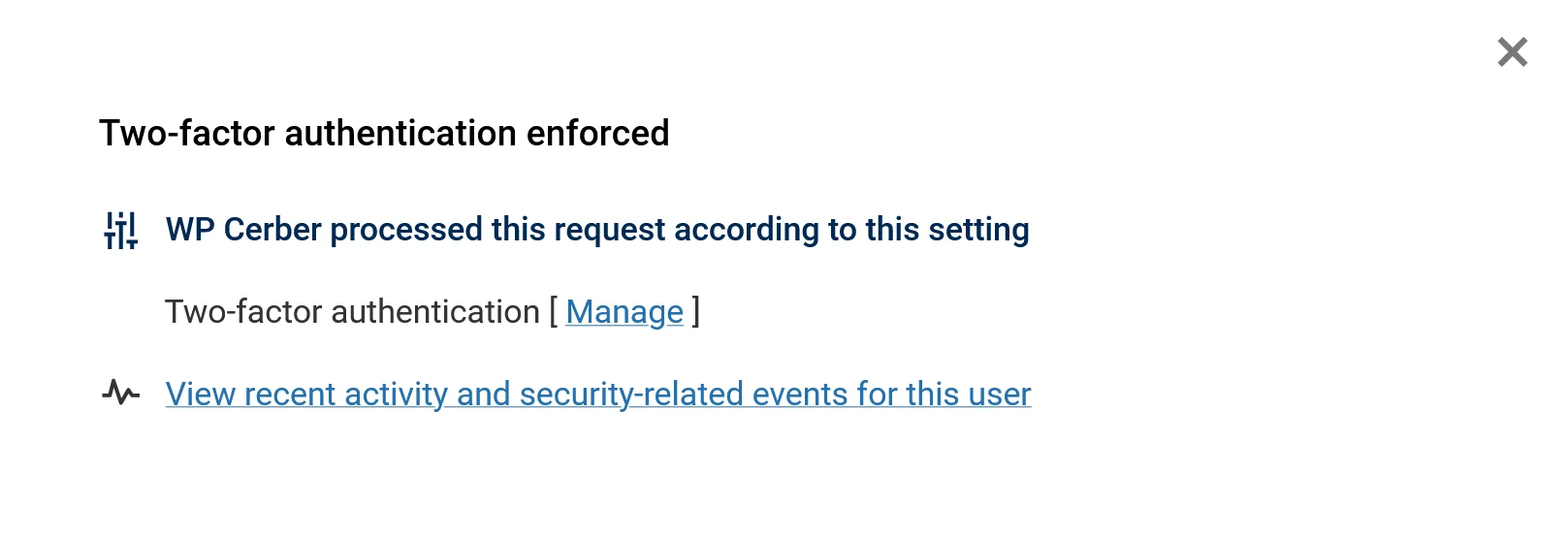
Two-factor authentication enforced explainer
Scroll and flash links center the setting. Native fragment navigation aligns the target with the top of the browser window, which is exactly where the admin bar sits. We now center the containing setting row when the page is ready and again after the window finishes loading. The second pass corrects native realignment and layout shifts caused by late-loading content. Field wrappers outside setting rows are left alone, and when the browser reports a prefers-reduced-motion preference, the scroll happens without animation.
Security Changes
A stricter URL escaper for admin output. We replaced the filter and regular expression stack inside crb_escape_url() with an explicit URL shape check. The helper now accepts root-relative URLs that begin with a single slash, in addition to the HTTP(S), FTP(S), and mailto forms it already supported. Protocol-relative URLs, backslash network-path variants, unsupported schemes, and other relative forms stay rejected.
We also stopped stripping quotes, angle brackets, and backticks from accepted URLs. Dropping the old sanitizer has a visible upside: non-ASCII URL paths survive intact. Invalid UTF-8 no longer collapses the escaped result into an empty attribute value, because the escaper now substitutes those bytes instead.
Reliability Improvements
Admin announcements are stored as structured data, not markup. We introduced UI Spec, a strict serialized form of WP Cerber’s internal UI Factory representation. Instead of persisting rendered HTML, the plugin now stores a versioned, validated document that is hydrated back into a UI tree at render time and passed to the active renderer.
Bugfixes
Only the first setting link in the Activity log worked. On the Activity log page, when several explainers were rendered for events involving the same user, and the rule behind WP Cerber’s decision was role-based, only the first link scrolled to and highlighted its target. Every link after it opened the role-based settings page without moving to the setting.
Raw HTML in the Mail Transport section. The section displayed the literal markup for the “Available in the professional version of WP Cerber” link instead of rendering a link. The notice had been appended as an HTML anchor to the section description, and section descriptions are escaped by the settings renderer before output. Section descriptions now stay plain text, and the PRO requirement is represented separately as a structured section link rendered through UI Factory. Escaping for descriptions is preserved, and section-level links render safely.
Summary
Triage gets shorter with this update. An Activity log explainer now leads straight to the setting behind the decision, centered and highlighted on screen. The Mail Transport section renders its PRO notice correctly, and admin links are escaped under stricter rules. Announcements are stored as validated structures, so broken data fails visibly instead of quietly.
Compatibility
This release has been tested with PHP 7.4.33, 8.0.30, 8.1.34, 8.2.33, 8.3.33, 8.4.24, and 8.5.9, and with WordPress 5.8.14, 6.6.6, 6.7.6, 6.8.7, 6.9.6, and 7.1.
Wonder what WP Cerber got in the previous version?
Review the release note for WP Cerber Security 9.9.3.
How to update WP Cerber
We recommend enabling automatic updates to ensure you always have the latest security features and performance improvements: how to enable automatic updates in the plugin settings.
How to install WP Cerber
New to WP Cerber? Follow this step-by-step guide to install WP Cerber on your WordPress.
Have any questions?
If you have a question regarding WordPress security or WP Cerber, ask it in the comments below or find answers on the community forum.
Spotted a bug or glitch?
We’d love to fix it! Share your bug discoveries with us here: Bug Report.



Development version 8.5.9.1
WP Cerber Security 8.6

I'm a software engineer and team lead at Cerber Tech. I started coding in 1993 on IBM System/370 and today software engineering at Cerber Tech is how I make my living.